How Power Amplifier Maintenance Works: Repair, Replacement, and Spare Parts
- Share
- Issue Time
- Jan 15,2026
Summary
Maintaining your power amplifier is crucial for optimal audio performance and longevity. This guide details identifying common issues, performing essential maintenance, and knowing when to seek professional help. Common problems include no sound, poor sound quality characterized by distortion, humming, crackling, or a single channel output. Power-related issues, such as the amplifier failing to turn on, often indicate a blown fuse, a deeper power supply problem, or activation of the protection m
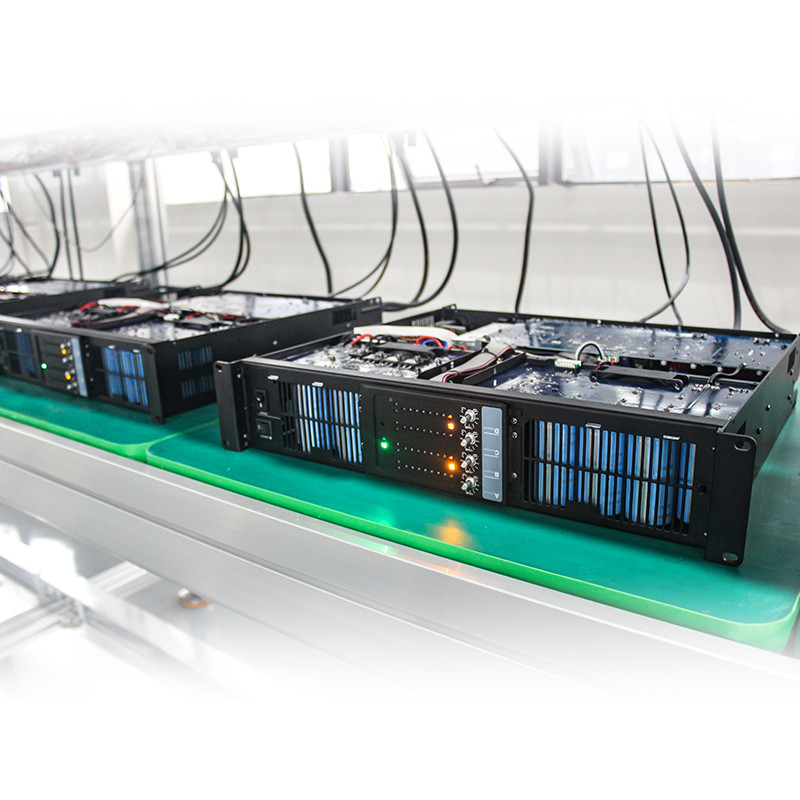
Understanding how to maintain, repair, and even replace parts of your power amplifier is key to ensuring your audio system performs at its best. A power amplifier is essential for boosting audio signals and driving your speakers, making it a critical component for any sound enthusiast.
Regular check-ups and maintenance can significantly extend the lifespan of your power amplifier and guarantee optimal sound quality. This guide will walk you through common issues, essential maintenance tasks, and help you decide when it’s time to seek professional help for your power amplifier. By following these guidelines, you can protect your investment and continue enjoying a rich, clear audio experience for years to come.
Identifying Common Power Amplifier Problems
Before you can perform maintenance or repairs, you must first identify the problem. Power amplifiers can exhibit a range of symptoms that point to underlying issues. Some are simple fixes, while others may signal more severe internal damage. Learning to recognize these common problems is the first step toward effective troubleshooting.
Recognizing Power Amplifier Malfunctions
When a power amplifier starts to fail, it usually provides clear indicators. These can range from a complete loss of sound to subtle degradation in audio quality or power-related issues. Pinpointing the exact symptom is crucial for an accurate diagnosis.
No Sound or Poor Sound Quality from Your Power Amplifier
One of the most alarming issues is when your amplifier produces no sound at all. If the unit powers on but remains silent, the problem could stem from incorrect input selection, muted outputs, or faulty speaker connections. Distorted, crackling, or humming sounds are also common complaints. These issues can be caused by a variety of factors, including "clipping," where the amplifier is overdriven, ground loop issues creating a hum, or failing internal components like capacitors and transistors that are degrading the signal path.
Common audio quality problems include:
- Distortion: A fuzzy or unclear sound, often caused by driving the amplifier beyond its limits (clipping) or failing output transistors.
- Humming or Buzzing: This is frequently related to a ground loop, which occurs when multiple audio components are connected to different electrical outlets. It can also be caused by poorly shielded cables picking up interference.
- Crackling or Popping: These noises can indicate dirty or oxidized controls (like volume knobs), loose internal connections, or failing capacitors.
- One Channel Out: If sound only comes from one speaker, the issue could lie in the balance control, a faulty speaker cable, or a problem within one of the amplifier's channels.
Power Issues: When Your Power Amplifier Won't Turn On
If the power amplifier shows no signs of life—no lights, no sound, no hum—the problem is related to its power supply. The most common and easily fixable cause is a blown fuse. Fuses are safety devices designed to protect the amplifier from power surges, and replacing them is usually straightforward. However, if a new fuse blows immediately, it indicates a more serious underlying problem, such as a short circuit in the power supply or a failed transformer. Another possibility is that the amplifier has entered "protection mode." Many modern amplifiers have a protection circuit that shuts the unit down to prevent further damage if it detects issues like overheating, short-circuited speaker wires, or internal component failure.
Troubleshooting Steps for Your Power Amplifier
Once you've identified a symptom, a methodical troubleshooting process can help you isolate the root cause without making unnecessary changes or causing further damage. Start with the simplest potential issues and work your way toward more complex ones.
Isolating the Root Cause: Checking Audio Sources First
Before you assume your amplifier is the culprit, it is essential to rule out any issues with your audio sources and cables. A significant number of perceived amplifier problems actually originate elsewhere in the signal chain. Start by confirming that your source device (like a turntable, CD player, or streamer) is powered on and playing. Check its volume level and ensure it is not muted. If the problem persists, try connecting a different, known-working source, such as your smartphone, to the amplifier. If this new source works correctly, the issue lies with your original source device, not the amp.
Examining Power Cords and Connections of Your Power Amplifier
Physical connections are a frequent point of failure. Carefully inspect every cable connected to your power amplifier. Ensure the main power cord is securely plugged into both the amplifier and a functioning wall outlet. If you are using a power strip or surge protector, try plugging the amplifier directly into the wall to rule out a problem with the strip.
Next, examine the speaker wires and interconnect cables. Check for frayed wires, loose strands of copper that could be causing a short circuit, and ensure the connectors are firmly seated in their respective terminals on both the amplifier and the speakers. Wiggle the connections slightly; if you hear crackling or the sound cuts in and out, the connection is intermittent and needs to be cleaned or re-secured. Over time, oxidation can build up on connectors, leading to poor signal transfer.
| Troubleshooting Checklist: Basic Issues |
|---|
| Symptom |
| No Power |
| No Sound (Power On) |
| Distorted Sound |
| Humming or Buzzing |
| One Channel Missing |
Essential Maintenance Tasks for Your Power Amplifier
Proactive and regular maintenance is the most effective way to prevent common power amplifier problems and extend the life of your equipment. These tasks are generally simple, require minimal technical skill, and go a long way in preserving audio fidelity and reliable performance.
Keeping Your Power Amplifier Clean
Dust, grime, and other environmental contaminants are enemies of electronic components. A clean amplifier not only looks better but also runs cooler and more efficiently. Regular cleaning should be a core part of your maintenance routine.
Gentle Cleaning: The Right Way to Clean Your Power Amplifier's Surface
For cleaning the exterior chassis of your amplifier, always start with the gentlest method. A dry, soft microfiber cloth is perfect for wiping away fingerprints and light dust. For more stubborn grime, you can slightly dampen the cloth with water. Never spray liquids directly onto the amplifier, as moisture can seep inside and damage sensitive electronics. Avoid using harsh chemical cleaners, solvents, or abrasive pads, as these can damage the finish or lettering on the faceplate. Always unplug the amplifier from the power outlet before any cleaning.
Clearing Dust: Maintaining Input and Output Ports of Your Power Amplifier
Dust and dirt are particularly problematic when they accumulate in ventilation slots, input/output jacks, and other openings. Blocked vents can lead to overheating, one of the primary causes of premature component failure. Use a can of compressed air to blow dust out of the vents and heatsinks. When doing this, use short bursts and hold the can upright to prevent the liquid propellant from spraying out. A soft-bristled brush can help dislodge stubborn dust before blowing it away.
Input and output jacks (like RCA or XLR connectors) can also accumulate dust, which can lead to poor connections and signal noise. Use compressed air to clean them out. For oxidized or dirty contacts, a specialized electronic contact cleaner is recommended to restore a clean, conductive surface.
Ensuring Optimal Performance and Longevity of Your Power Amplifier
Beyond cleaning, several best practices will help protect your amplifier from electrical and physical stress, ensuring it operates within its designed parameters for a longer, more reliable lifespan.
Ventilation Matters: Preventing Overheating in Your Power Amplifier
Heat is the number one enemy of electronic components. Power amplifiers, especially high-powered models, generate a significant amount of heat during operation. If this heat is not dissipated effectively, it can degrade and eventually destroy internal components like capacitors and transistors. Ensure your amplifier has adequate ventilation by allowing several inches of clear space around its top and sides. Never stack other components directly on top of your amplifier or place it in a sealed, unventilated cabinet. If you must place it in an enclosure, consider installing a small, quiet fan to ensure active airflow.
Protecting Your Power Amplifier: Avoiding Excessive Volumes and Moisture
Pushing your amplifier to produce volume levels beyond its capability causes the audio waveform to "clip." This not only creates harsh distortion but also sends a damaging form of DC current to your speakers and puts immense strain on the amplifier's output stage. Listen for any signs of distortion at high volumes and turn it down if you hear any. Operating your gear responsibly is a free and effective way to ensure its longevity. Furthermore, keep the amplifier in a climate-controlled, low-humidity environment. Moisture can cause corrosion on internal circuit boards and lead to short circuits and permanent damage.
Considering Surge Protection for Your Power Amplifier
Your amplifier is vulnerable to electrical fluctuations from the power grid. A power surge, even a small one, can damage or destroy sensitive electronic components within the power supply. At a minimum, your amplifier should be connected to a quality surge protector. For even better protection and performance, consider a power conditioner. A power conditioner not only provides surge protection but also filters out electromagnetic interference (EMI) and radio frequency interference (RFI) from the AC line, which can help reduce background noise and improve overall sound clarity.
Power Amplifier Repair, Replacement, and Professional Assistance
Even with meticulous maintenance, components can fail over time. When a problem arises, you need to decide whether to attempt a do-it-yourself repair, seek professional help, or consider a replacement. This decision depends on the complexity of the issue, your technical skills, and the value of the amplifier.
DIY Repairs for Your Power Amplifier: When It's Possible
Some repairs are within reach for hobbyists with basic electronics knowledge and the right tools. However, safety should always be the top priority. Always unplug the amplifier and allow it to sit for several minutes before opening the chassis to allow capacitors to discharge.
Addressing Loose Connections: Soldering for Your Power Amplifier
Vibrations and thermal cycles can cause solder joints to crack over time, leading to intermittent connections. These are common around heavy components or jacks that are frequently used. If you are comfortable with a soldering iron, re-flowing these cracked joints can be a simple and effective fix. This requires a steady hand and a good quality soldering iron to avoid damaging the circuit board or adjacent components. Always use solder and flux intended for electronics work.
Replacing Burnt-Out Components in Your Power Amplifier
The most common user-replaceable component is a fuse. If an amplifier blows a fuse, you can replace it with a new one of the exact same type and rating. Using a fuse with a higher rating can lead to catastrophic failure and fire hazard. Other components like swollen or leaking capacitors, or visibly burnt resistors, can sometimes be replaced. However, this requires the ability to identify the component, source an exact or equivalent replacement part, and desolder the old part without damaging the circuit board.
Tackling Oxidized Contacts and Jacks in Your Power Amplifier
Over time, input/output jacks and potentiometers (volume and tone controls) can become oxidized or dirty, causing crackling, static, or signal dropouts. This is often fixable with a high-quality electronic contact cleaner, such as DeoxIT. For jacks, you can spray a small amount of cleaner onto a Q-tip or a matching plug and work it in and out of the jack to clean the internal surfaces. For crackling knobs, you may need to open the amplifier's chassis to get access to the opening on the potentiometer's casing and spray a small amount inside while rotating the knob back and forth.
When to Seek Professional Help for Your Power Amplifier
For complex or dangerous issues, a qualified electronics technician is your best and safest option. Attempting advanced repairs without proper knowledge and equipment can cause irreparable damage to the amplifier or pose a risk of electric shock.
Diagnosing Mainboard Failures in Your Power Amplifier
If you've ruled out simple issues and the amplifier still malfunctions, the problem likely lies within the main circuit board. Issues like a major power supply failure, a faulty protection circuit, or damaged output transistors require specialized diagnostic equipment like oscilloscopes and multimeters to trace the circuit and identify the failed component. Attempting to diagnose and repair these issues without formal training is highly likely to fail and may cause cascading damage. A professional technician has the expertise to accurately diagnose the fault and perform a safe repair.
Refurbishing Vintage Power Amplifiers: Vacuum Tubes and Capacitors
Vintage amplifiers, especially those that use vacuum tubes, require specialized knowledge for restoration. Vacuum tubes have a finite lifespan and must be replaced with matched sets to ensure balanced performance. Additionally, the electrolytic capacitors in vintage gear dry out and degrade over 20-30 years, a process that can negatively impact sound quality and reliability. Replacing these capacitors (a process known as "re-capping") is a common restoration procedure but involves working with high voltages and requires a deep understanding of the original circuit.
Understanding Full Overhauls for Your Power Amplifier: Component Replacement
For high-end or cherished amplifiers, a full overhaul or restoration can bring the unit back to or even exceed its original performance specifications. This is far more involved than a simple repair. A technician will methodically test and replace all components that are known to age and drift out of spec, such as electrolytic capacitors, certain resistors, and transistors. This is a labor-intensive process but can be a worthwhile investment for a valuable piece of equipment, ensuring it performs reliably for many more decades.
Consulting User Manuals and Audio Equipment Manufacturers for Your Power Amplifier
Before attempting any repair, your first resource should be the amplifier's user manual. It often contains a troubleshooting section that covers common problems and solutions specific to your model. If you are facing a complex issue, contacting the manufacturer's customer support or a certified service center is a wise step. They have access to service manuals, schematics, and genuine spare parts that are not available to the general public, ensuring a correct and lasting repair.
Frequently Asked Questions (FAQ)
1. How often should I clean my power amplifier?
For general upkeep, a light dusting of the exterior and vents with a dry microfiber cloth should be done weekly or bi-weekly, depending on how dusty your environment is. A more thorough cleaning, involving compressed air to clear out heatsinks and vents, is recommended every 6 to 12 months. If you live in a home with pets or smokers, you may need to perform these deeper cleanings more frequently, perhaps every 3 to 4 months, to prevent buildup that can impede airflow and cause overheating.
2. What is the most common reason a power amplifier fails?
Heat is the single most common cause of premature failure in a power amplifier. The electronic components inside, particularly electrolytic capacitors and output transistors, are sensitive to high temperatures. Over time, excessive heat accelerates their degradation, causing them to drift from their specified values or fail entirely. This is why ensuring proper ventilation is the most critical maintenance task. Other common causes include age-related component failure (capacitors drying out) and electrical events like power surges.
3. Is it worth repairing an old power amplifier?
This depends on three factors: the quality of the amplifier, the cost of the repair, and its sentimental value. High-quality vintage amplifiers were often built to a very high standard and can sound fantastic once restored. Repairing or refurbishing such a unit is often a better investment than buying a new, lower-quality amplifier for the same price. Get a quote from a reputable technician first. If the repair cost exceeds 50-60% of the price of a comparable new amplifier, you may want to reconsider, unless the unit has significant sentimental value.
4. Can I use any fuse to replace a blown one in my amplifier?
Absolutely not. You must replace a blown fuse with a new one that has the exact same type and amperage rating. The fuse's rating is carefully chosen by the manufacturer to protect the amplifier's sensitive internal components from damaging overcurrent situations. Using a fuse with a lower rating will cause it to blow unnecessarily, while using one with a higher rating negates its protective function, creating a serious fire hazard and risking catastrophic damage to the amplifier's power supply and other circuits. Always check the value printed on the old fuse or in the user manual.
5. What does it mean when my amplifier goes into "protection mode"?
"Protection mode" is a safety feature in most modern amplifiers designed to prevent severe damage. When the amplifier's internal circuitry detects a dangerous condition, it shuts itself down or disconnects the speakers. Common triggers include:
- Overheating: The internal temperature has exceeded a safe limit.
- Short Circuit: Often caused by stray speaker wire strands touching at the terminals.
- Overcurrent: Drawing too much power, possibly due to very low-impedance speakers.
- Internal Component Failure: A critical part like an output transistor has failed. If your amp enters protection mode, turn it off, unplug it, and double-check all your speaker wiring for shorts. Let it cool down completely before trying again. If it repeatedly enters protection mode, it needs to be serviced by a professional.
Conclusion
By following these guidelines for maintenance and knowing when to approach repairs with caution or professional help, you can ensure your power amplifier continues to deliver rich, clear sound for years to come. Your power amplifier is an investment in your audio enjoyment, and proper care is the best way to protect that investment. From simple cleaning and ensuring proper ventilation to understanding the symptoms of more serious issues, these practices will help you achieve consistent, high-fidelity performance.
Don't hesitate to consult experts if you're unsure about any aspect of your power amplifier's care, especially when dealing with internal electronics and high voltages. Regular attention to your power amplifier will not only save you from potentially costly repairs but will also significantly enhance your overall audio experience. We encourage you to share this guide with other audio enthusiasts and continue learning about the equipment that brings your music to life.